@JanFiess Nick, thanks for sharing the additional visuals.
First, I am not sure why the Cinema Pairings are not available to apply to your captures. To be able to see what is going on, I would need to take a look at the complete Depthkit project directory which includes these captures and calibration, as well as any additional Depthkit project directories which contain the Cinema Pairings you were trying to import.
For the reasons listed below, it’s unclear if enabling Cinema texturing on this asset and others captured using the same configuration will improve the result.
Setting that issue aside, from what I see, it looks like the Studio calibration is generally good as indicated by the lack of any seams or misalignments in the shaded view of the subject. Additionally, the lack of background pixels appearing around the edge of the subject in the CPP video/image color tiles gives me confidence that the internal calibrations of each sensor are also good.
I agree that positioning the sensors closer to the subject would have resulted in higher quality, but you may be able to slightly improve what you have by:
- Adjusting the walls and especially the top of the bounding box in closer to your subject using the handles in the 3D Viewport or the settings in the Edit > Isolate panel.
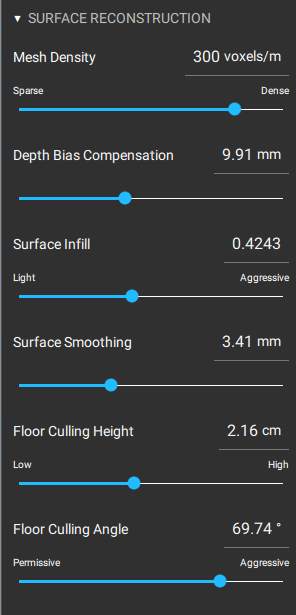
- Adjusting the Surface Reconstruction > Depth Bias setting. It looks like this setting may be too low, causing the geometry to be “squished”, but I am not sure if that is intentional to reduce other artifacts. The default value of 8.0mm is usually best for reconstructing human faces.
- The export you shared with me looks like it is constrained to 2048x2048 resolution. Is this required for the project you are working on? A higher resolution export will preserve more detail.
It’s also worth noting that because none of the sensors are positioned directly in front of the subject’s face, the texturing for the face is split between two sensors off to either side (as seen in the cyan-green texturing contribution view in your screenshot). When viewing the asset from the side, this looks fine, but when viewing the subject from the front, subtle differences between these two sensors and the way that their color data is projected on the reconstructed asset might produce artifacts like asymmetries or the appearance that the subject is “cross-eyed”.
Let us know if you’re able to share the Depthkit project directories referenced above to further troubleshoot.