
Does anyone know if Depthkit files will work with the VR panorama plugin for unity? I am trying to render out a 360 video and running into lots of issues. Thinking it could be a problem with my Depthkit videos preventing a clean render.
Depth kit and VR panorama plugin for unity
24 posts · 1262 views
Hi @ElizabethLeister, are you running into synchronization issues? If so, I may have a script that could be a helpful reference. I can email it to you. Can I ask what other issues you are facing?
Hi Jillian,
The rendered video plays back at 2x speed without capturing any audio. It also plays my depthkit file and then plays my particle effects sequentially while my video background loops. It captures the entire video this way about three times in the single video. The files are large but I could try to share one with you if that might help.
Thanks,
Elizabeth
Thanks for clarifying, @ElizabethLeister! Hold tight on sharing the video just yet. I just emailed you a script that you can attach to each Depthkit clip that should fix the playback speed during rendering. Let me know if that helps!
Thank you so much. I’ll try this today and let you know what happens. Appreciate the quick reply!
Got the same result. Trying to run it with the Videosync AVP but getting this error -
Assets\Plugins\UnityPlugin_VideoSync_KK\VideoSyncAVP.cs(19,81): error CS0246: The type or namespace name ‘ErrorCode’ could not be found (are you missing a using directive or an assembly reference?)
VR panorama “render panorama” button is red and won’t start the render because of the error…
Hi again
I tested it a few more times (without the error message)
The depthkit video plays really fast - double time and then stops - everything else seems to play in real time 30 fps although my background video seems to loop twice. I am only trying to render out a 360 video to share with the sound designers so they can get working. Can you recommend any other workflow to share the scenes with them?
Thank you
Elizabeth
@ElizabethLeister I’m sorry this isn’t working as expected. Did you apply the script to the Depthkit clip itself?
Hi @ElizabethLeister, I’m a bit confused as to why this isn’t working as intended. I’ll do some testing on my end and circle back with what I find.
That would be great. I’m at a bit of a loss…
Thanks!
Problem resolved. It seems that the AVPro video plugin was at least part of the issue. Once I changed back to the Unity video player and applied the video sync script, it worked. We also added a fixed time script to assure that all videos played at the same fps.
Thanks Jillian, I’m struggling with similar issues still. I applied the script to my depthkit clip however i’m trying to export using the regular unity recorder and the script doesnt seem to do anything. I need to export a regular 1920x1080 video (not 360 video) but if the VR panorama plugin supports exporting regular/flat video I’d happily purchase it and use that just to resolve the issue. Maybe @ElizabethLeister knows, does VR panorama support regular video exports too?
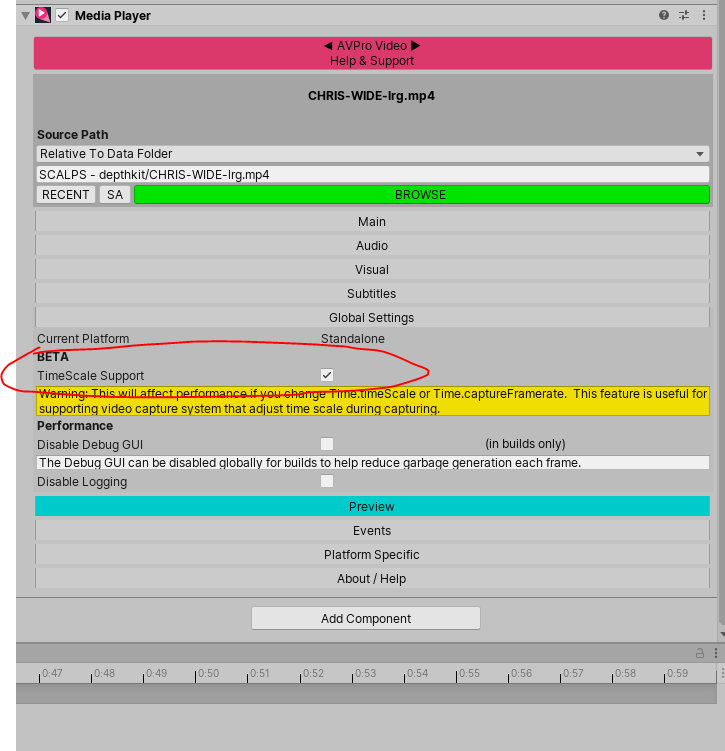
Also just FYI for anyone else out there who is stuggling with Depthkit (or other video) syncing when exporting video from unity, I found that using the AVPro video player will fix this issue too. It has a checkbox called “TimeScale Support” which needs to be checked prior to exporting/rendering and can be used with the regular uniry recorder. However its a pretty costly solution as AVPro Video starts at $150. I’d prefer the VR panorama solution above though if it does support exporting regular flat videos too as I have another project which I want to use depthkit and 360 exports for in the future, so hoping it does and will be an all in one solution for a lower cost.
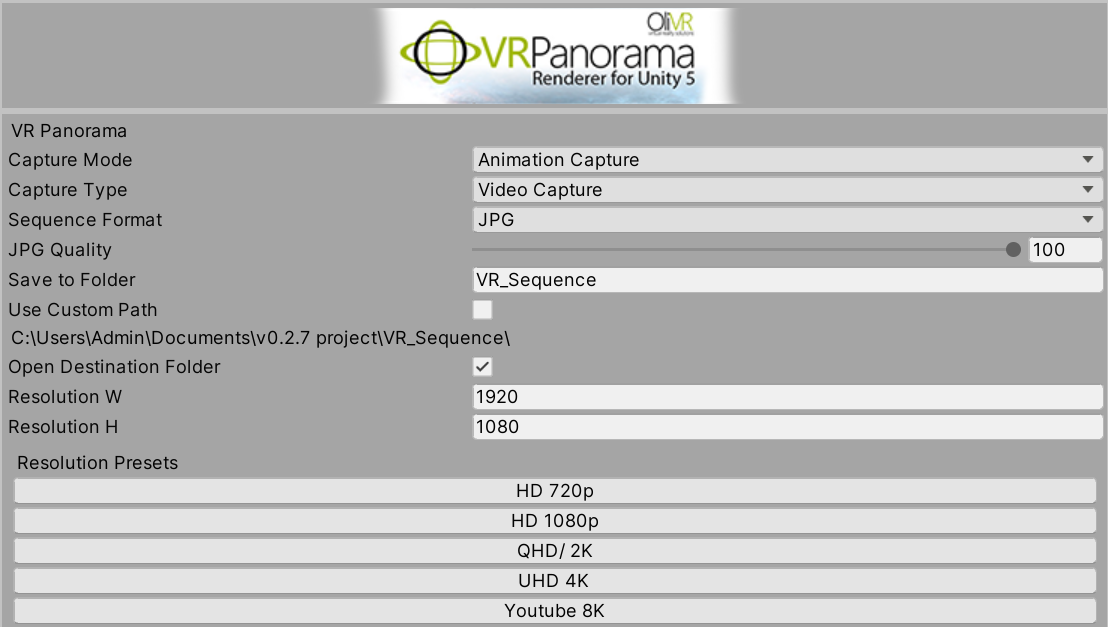
I used VR Panorama to export a 2d video from Unity and it worked with the video sync script and the Unity video player only.
AVPro video would not work for me with (360) or standard video.
Great, thanks for the clarification @jillianmorrow and @ElizabethLeister! I will use the unity player video player and VR panorama in that case. Going to give it a shot this weekend 🙂
Hmmm, @jillianmorrow or @ElizabethLeister do you happen to have a teat project using VR Panorama and Depthkit which I could take a look at. I just tried using it with the Unity Video player and the script but it doesnt seem to work with depthkit. Works with regular videos, but still plays fast with depthkit clips…
Hi @jillianmorrow actually scratch that! I had simply forgotten the depthkit clips I was using were only 15FPs, so had to match the output FPS in VR Panorama to match it!! I’ll actually likely go and re-export them at a higher FPS so the final output is smoother. FALSE alarm, VR panorama with the script totally works 🙂 Thanks!
Hello @jillianmorrow @Chris and @ElizabethLeister
Thanks for sharing this. Are you still using VR Panorama now with Depthkit clips? I have used this asset before working with Depthkit, and have generally had good results.
I have it loaded in my current Unity 2020.3.33 HDRP project with Depthkit Studio clips but the results are not great so far. @jillianmorrow have applied the VideoSync code to my clips already which helps a little but not enough. I just wandered if folks here were getting good results with Unity 2020 and / or with Depthkit + Shadergraph or VFX Look clips?
@CoryAllen I am also testing the AVPro2 workflow, and having some challenges there.
I will create a new post about this with more information and screenshots.
Thanks
We definitely recommend the modern tutorial you mention for a new workflow for that covers this with Unity’s built-in components + AVPro 2.
Curious to hear what issues you are encountering.
Thanks @James
I will pivot back to my @OliviaMcGilchrist login and share some updates about this shortly