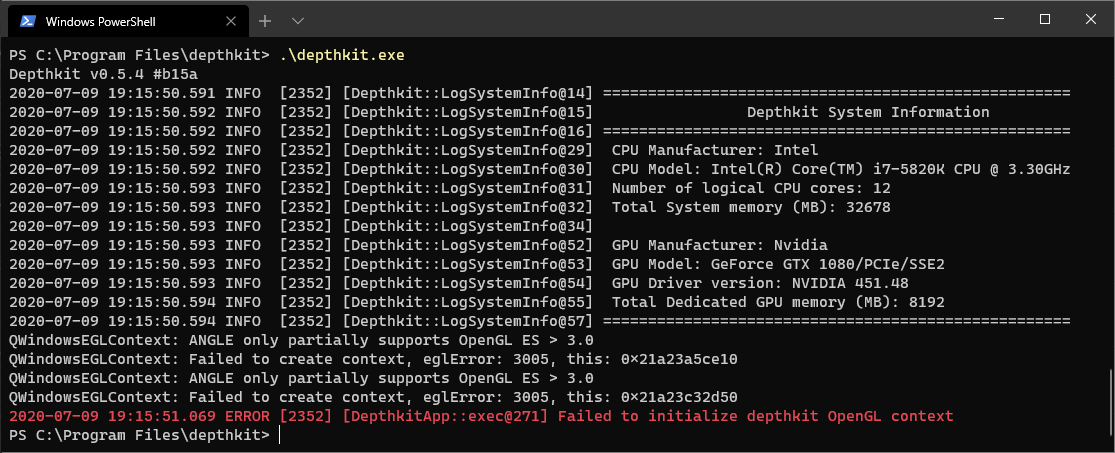
Recently i’ve downloaded Depthkit 0.5.4, to evaluate this application for a project that i have in hands, i have the Kinect V2 working perfectly but for some strange reason i cant seem to open Depthkit application. This error appears in the terminal window.
PS C:\Program Files\depthkit> .\depthkit.exe
Depthkit v0.5.4 #b15a
2020-07-09 19:15:50.591 INFO [2352] [Depthkit::LogSystemInfo@14] ====================================================
2020-07-09 19:15:50.592 INFO [2352] [Depthkit::LogSystemInfo@15] Depthkit System Information
2020-07-09 19:15:50.592 INFO [2352] [Depthkit::LogSystemInfo@16] ====================================================
2020-07-09 19:15:50.592 INFO [2352] [Depthkit::LogSystemInfo@29] CPU Manufacturer: Intel
2020-07-09 19:15:50.592 INFO [2352] [Depthkit::LogSystemInfo@30] CPU Model: Intel® Core™ i7-5820K CPU @ 3.30GHz
2020-07-09 19:15:50.593 INFO [2352] [Depthkit::LogSystemInfo@31] Number of logical CPU cores: 12
2020-07-09 19:15:50.593 INFO [2352] [Depthkit::LogSystemInfo@32] Total System memory (MB): 32678
2020-07-09 19:15:50.593 INFO [2352] [Depthkit::LogSystemInfo@34]
2020-07-09 19:15:50.593 INFO [2352] [Depthkit::LogSystemInfo@52] GPU Manufacturer: Nvidia
2020-07-09 19:15:50.593 INFO [2352] [Depthkit::LogSystemInfo@53] GPU Model: GeForce GTX 1080/PCIe/SSE2
2020-07-09 19:15:50.593 INFO [2352] [Depthkit::LogSystemInfo@54] GPU Driver version: NVIDIA 451.48
2020-07-09 19:15:50.594 INFO [2352] [Depthkit::LogSystemInfo@55] Total Dedicated GPU memory (MB): 8192
2020-07-09 19:15:50.594 INFO [2352] [Depthkit::LogSystemInfo@57] ====================================================
QWindowsEGLContext: ANGLE only partially supports OpenGL ES > 3.0
QWindowsEGLContext: Failed to create context, eglError: 3005, this: 0x21a23a5ce10
QWindowsEGLContext: ANGLE only partially supports OpenGL ES > 3.0
QWindowsEGLContext: Failed to create context, eglError: 3005, this: 0x21a23c32d50
2020-07-09 19:15:51.069 ERROR [2352] [DepthkitApp::exec@271] Failed to initialize depthkit OpenGL context
I would like to know if there is something missing, since i am making the decision to buy the application.
Thank You,
Ricardo