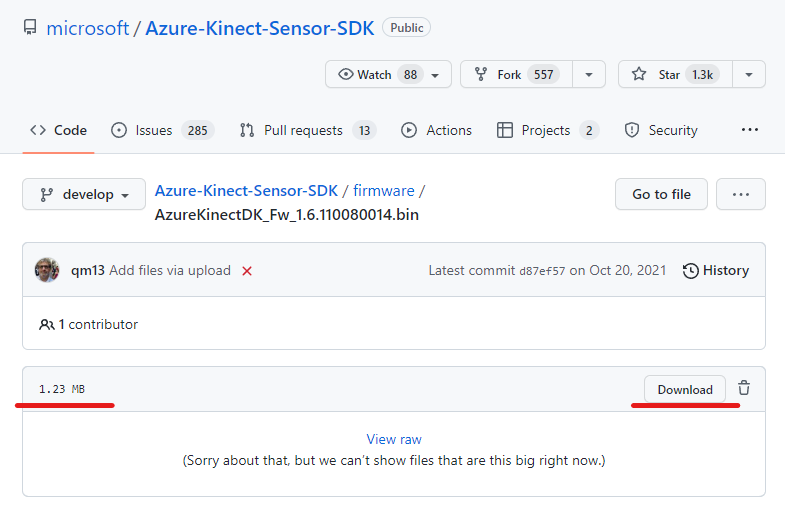
I have been unable to update any of the three Azure Kinects I am working with to update to the latest firmware. I consistently receive a CRC error in the command prompt which I have been unable to solve.
My process:
- Download firmware from Azure-Kinect-Sensor-SDK/firmware at develop · microsoft/Azure-Kinect-Sensor-SDK · GitHub
- Connect devices and ensure they are registering with computer correctly
- Follow instructions from Update Azure Kinect DK firmware | Microsoft Learn
- Repeatedly receive the following error regardless of whether I am attempting to update a single or multiple devices, and regardless of where I use the specific serial or not:
== Azure Kinect DK Firmware Tool ==
Loading firmware package firmware\AzureKinectDK_Fw_1.6.110080014.bin.
File size: 143361 bytes
[2023-01-31 17:22:52.978] [error] [t=4868] D:\a\1\s\extern\Azure-Kinect-Sensor-SDK\src\firmware\firmware.c (393): parse_firmware_package(). Firmware Package CRC error. original crc: 0x0A0A3E6C calculated crc: 0x9469BC03
[2023-01-31 17:22:52.979] [error] [t=4868] D:\a\1\s\extern\Azure-Kinect-Sensor-SDK\src\firmware\firmware.c (416): parse_firmware_package(). Firmware Package too many Depth Configurations. 11617
[2023-01-31 17:22:52.979] [error] [t=4868] D:\a\1\s\extern\Azure-Kinect-Sensor-SDK\src\firmware\firmware.c (435): parse_firmware_package(). Firmware Package Authentication block not found.
ERROR: CRC check failed
Expected behavior is that the devices are updated to the appropriate firmware so I can use them. I have successfully followed this process to ensure that all devices are on AzureKinectDK_Fw_1.6.110079014.bin, and I had no difficulty in doing so.
OS: Windows 10 Enterprise (build 19044.2486)
CPU: 11th Gen Intel(R) Core™ i7-11850H @ 2.50GHz 2.50 GHz
SDK: Azure Kinect v1.4.1
Current Firmware: 1.6.110079014
Please help, thanks!